Automation & Scraping
Scrapia
Point-and-click web scraper with self-healing selectors, a CLI, an API and a scheduler
Source code
$39.99Windows · macOS · Linux +2
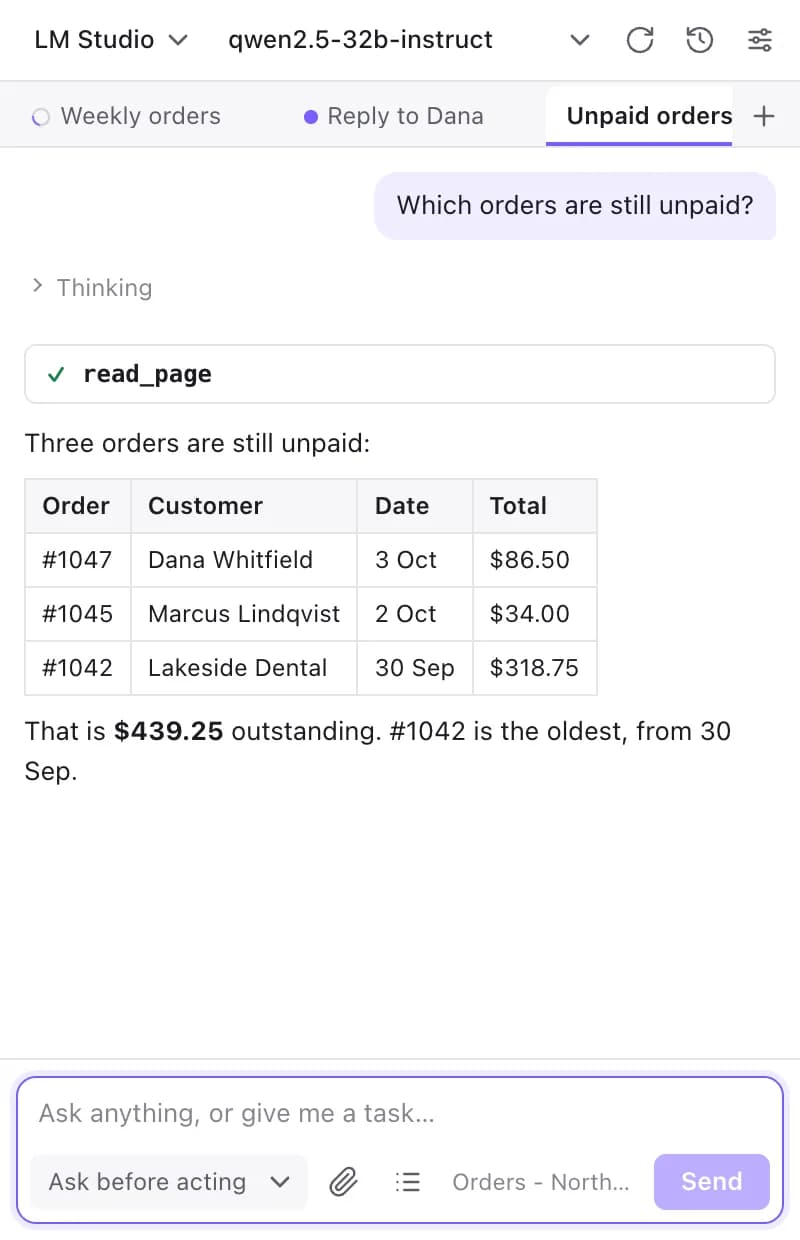
An AI agent in your browser's side panel that works on the page beside you
One-time payment · Delivered as soon as payment confirms · No added fees
Screenshots
Ask about the page beside you
Approve each action before it happens
Queue one job per line
Line up prompts while a job runs
Computer tools always ask first
Every chat saved on your computer
Guided setup
Dark mode
Overview
AI Browser Automation Pro puts an agent in your browser's side panel. Pick a model, describe the job, and it works on the page beside you: it reads the page, clicks, types, chooses options, fills forms, replies to customer inquiries and applies the same change across many rows. It can also research in other tabs, read attached PDFs and spreadsheets, and create or edit images.
You decide where the model runs. LM Studio and Ollama on your own computer are preconfigured, so with a local model nothing leaves your machine. Cloud providers such as Google Gemini, OpenRouter, Groq, Mistral, DeepSeek and xAI connect with your own API key, as does any service with a compatible chat-completions endpoint.
By default the agent asks before anything that changes a page, such as clicking, typing, uploading, downloading or running a script. Jobs keep running when you close the panel, a queue and a batch tool let you line up hundreds of items, and memory keeps a progress note for long jobs and remembers facts you want kept, for one site or everywhere.
An optional companion program extends the agent to your computer: terminal sessions, files, the clipboard, desktop apps on macOS and Linux, and local MCP servers. Every computer-tool call asks for your approval. The companion can also open a secure tunnel so another browser or app can use the models on your home or office machine.
Features
Reads the page as an outline of numbered elements, then clicks, types, selects, scrolls and fills forms for you.
LM Studio and Ollama work out of the box. Add cloud providers with your own API key, or any compatible endpoint.
Approve each change, allow a tool for one chat, or switch to unattended mode for bulk work you trust.
Paste a list of URLs, names or order numbers and run one prompt per line, all at once or one at a time.
Close the panel and the job continues. Approvals and finished jobs arrive as desktop notifications.
Attach PDF, Word, Excel and PowerPoint files, search the web, fetch pages and work across several tabs.
Create or edit images with your chat model or an image vendor key, preview them on the page and upload them to the site.
A per-chat progress note keeps long jobs on track, and saved facts carry across chats for one site or everywhere.
With the companion: terminals, files, clipboard, desktop apps and local MCP servers, with every call approved by you.
Pricing
Packaged extensions for every supported browser, with the source.
One-time payment · USD · no fees added
What you get
Instant delivery
Download links and your license key by email as soon as payment confirms.
Free future updates
Every future version at no extra cost, on your order page the day it ships.
Security reviewed
Tested by our engineers and by AI-driven analysis before every release.
Pay with crypto
The payment page shows the exact amount, the address and a QR code.
No added fees
You pay exactly the listed price.
Support from real people
Questions go to humans@thinktools.dev.
FAQ
Can't find what you're looking for? See the store FAQ or write to humans@thinktools.dev.
More from ThinkTools
Automation & Scraping
Point-and-click web scraper with self-healing selectors, a CLI, an API and a scheduler

Telephony & VoIP
Multi-account SIP and IAX2 softphone for desktop, mobile and Raspberry Pi

Desktop Utilities
Real-time voice changer with 78 realistic voices, noise removal and a music bed